
Everything you're reading right now was written in a custom admin panel, saved to a database, and automatically triggered a full site rebuild, all without me touching a terminal. Here's how it works.
The Architecture at a Glance
┌─────────────────────────────────────────────────────┐
│              GitHub Pages (Static Hosting)          │
│  ┌─────────┐  ┌──────────┐  ┌────────────────────┐  │
│  │  Home   │  │ Blog     │  │ Blog Post [slug]   │  │
│  │  (SSG)  │  │ List SSG │  │ (SSG via entries())│  │
│  └─────────┘  └──────────┘  └────────────────────┘  │
│              Admin / Journal (Client SPA)           │
└──────────────────────┬──────────────────────────────┘
                       │ (read)
┌──────────────────────▼───────────────────────────────┐
│                    Firestore                         │
│  ┌────────────────────────────────────────────────┐  │
│  │  blogs  │  media_gallery  │  journal  │ habits │  │
│  └────────────────────────────────────────────────┘  │
└──────────────────────┬───────────────────────────────┘
                       │ (write)
┌──────────────────────▼───────────────────────────────┐
│            Firebase Cloud Functions                  │
│  deployOnPostChange → GitHub API dispatch → rebuild  │
│  compileJournalHappinessInsights (cron: 1st/month)   │
└──────────────────────────────────────────────────────┘
Two sides of the same site:
- Public pages (
/,/blogs/,/blogs/post-slug) are prerendered at build time into static HTML. No database calls at request time. No server at all. - Admin pages (
/admin/,/admin/login/) are client-side only SvelteKit pages, gated behind Firebase Auth. Zero server-rendered routes, zero server cost.
Content Management Without Local Files
Most static site generators store blog posts as .md files in a folder. That works, but it means you're editing text files, committing to git, and waiting for a deploy every time you spot a typo.
I went a different route. Blog posts live entirely in Firestore as documents:
interface BlogPost {
  id: string;
  title: string;
  slug: string;            // URL-safe identifier
  excerpt: string;         // Shown on the blog list
  content: string;         // Full markdown body
  coverImage: string | null;
  imageMeta: Record<string, { width: number; height: number }>;
  status: 'draft' | 'published' | 'unlisted';
  createdAt: Timestamp | null;
}
Why this matters: Content lives in a real database. You can query it (WHERE status = 'published' ORDER BY createdAt DESC), filter it, paginate it with cursors, and lock it down with Firestore Security Rules. No file I/O, no git conflicts when you're editing on your phone, and no "I forgot to commit before I deployed."
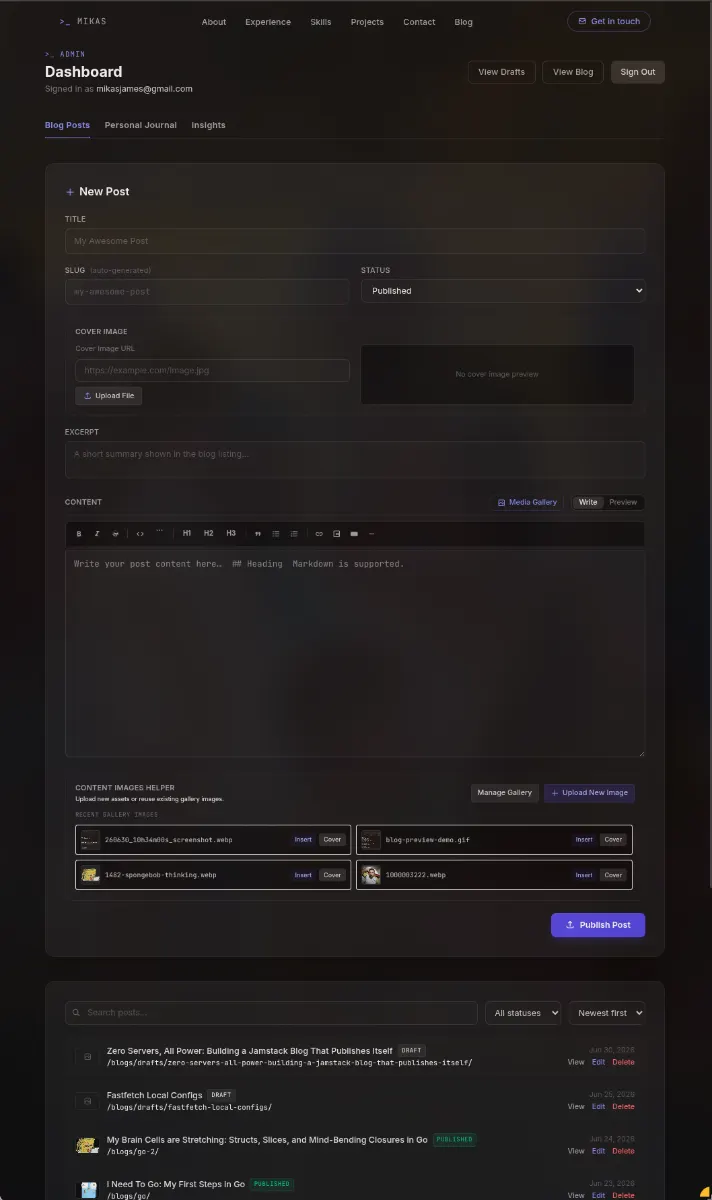
The admin panel is a full CRUD app: title and slug fields, a rich markdown editor with live preview, cover image picker, and a status toggle for draft / published / unlisted. Write your post, pick "Published," and walk away.
Previewing Drafts Without Building Anything
"But wait," you're thinking, "if only published posts get prerendered into static HTML, how do you preview a draft?"
The admin panel handles this entirely in the browser. There are two complementary preview mechanisms:
1. Live markdown preview in the editor. While you write, a split-pane preview renders your markdown in real time, showing images, video embeds, headings, and everything else. You see exactly how the post will look without leaving the editor.
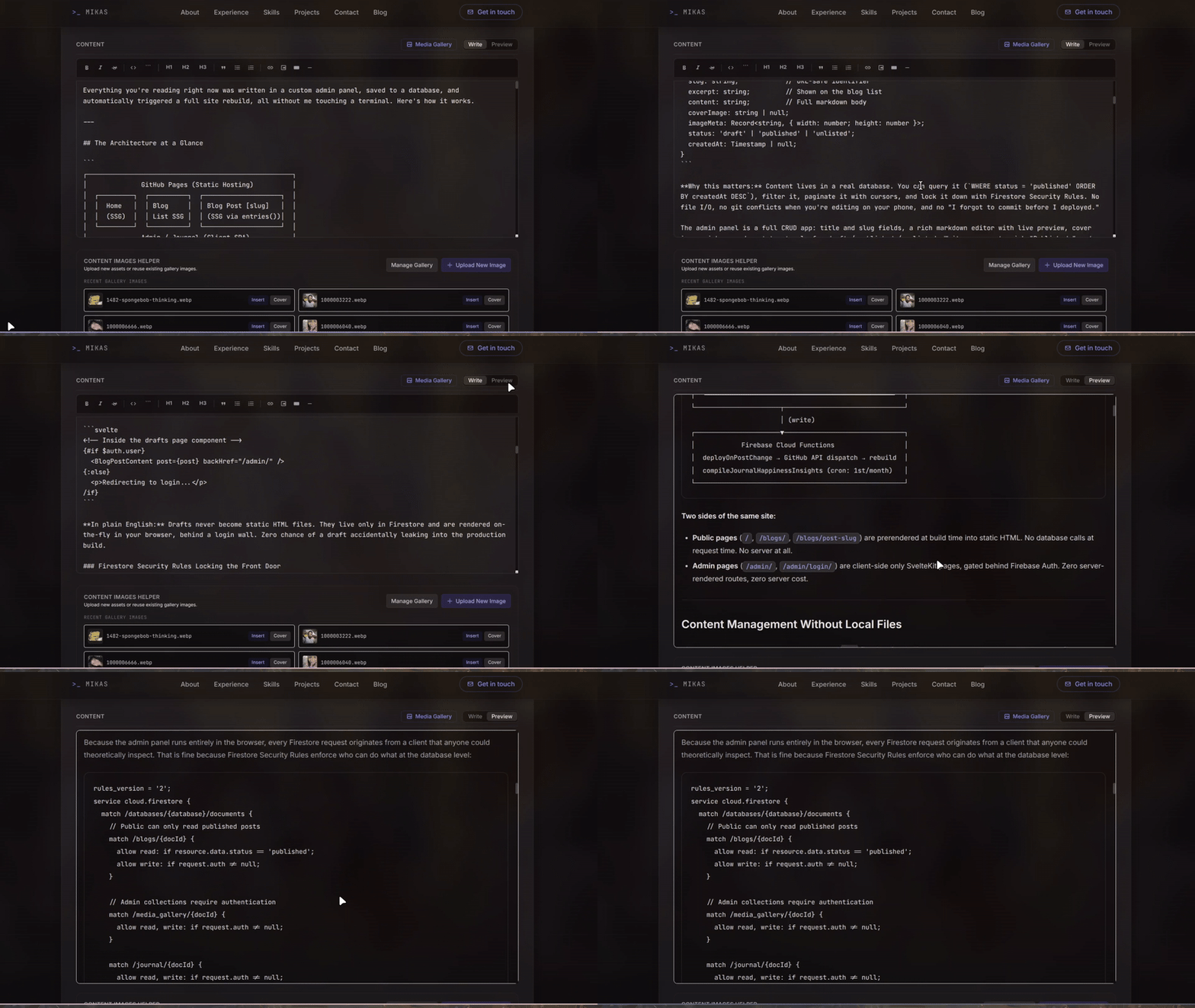
2. A client-side draft route. The /blogs/drafts/[slug] route is explicitly excluded from prerendering (export const prerender = false) and runs as a client-side SPA. When you navigate there, it fetches the draft directly from Firestore using the same <BlogPostContent> component that renders published posts, but with authentication required:
// src/routes/blogs/drafts/[slug]/+page.js
export const prerender = false;
export const ssr = false;
<!-- Inside the drafts page component -->
{#if $auth.user}
  <BlogPostContent post={post} backHref="/admin/" />
{:else}
  <p>Redirecting to login...</p>
/if}
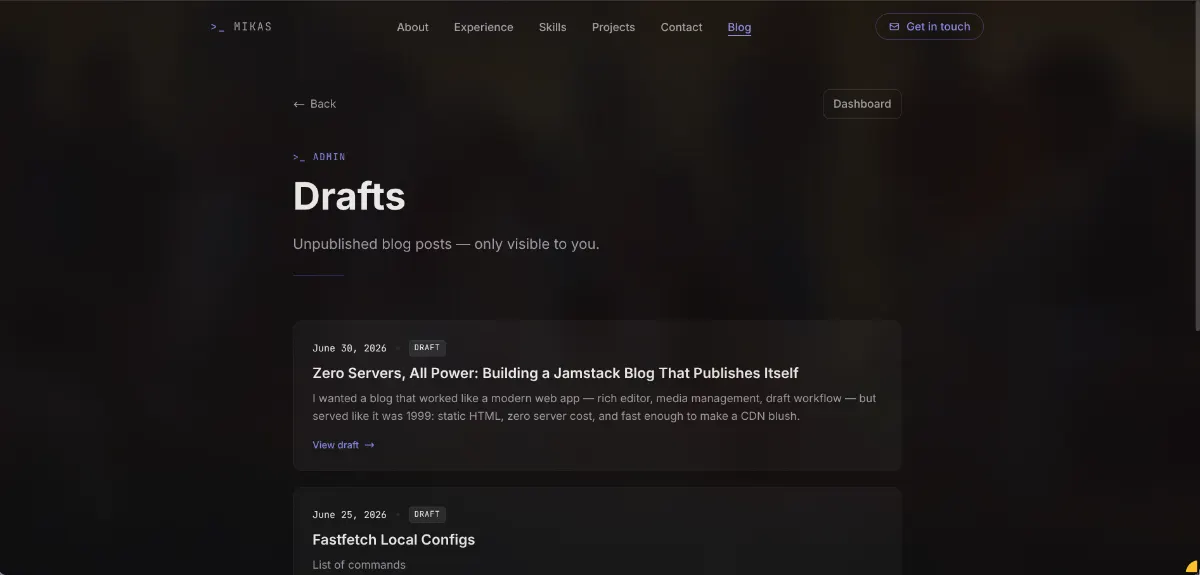
In plain English: Drafts never become static HTML files. They live only in Firestore and are rendered on-the-fly in your browser, behind a login wall. Zero chance of a draft accidentally leaking into the production build.
Firestore Security Rules Locking the Front Door
Because the admin panel runs entirely in the browser, every Firestore request originates from a client that anyone could theoretically inspect. That is fine because Firestore Security Rules enforce who can do what at the database level:
rules_version = '2';
service cloud.firestore {
  match /databases/{database}/documents {
    // Public can only read published posts
    match /blogs/{docId} {
      allow read: if resource.data.status == 'published';
      allow write: if request.auth != null;
    }

    // Admin collections require authentication
    match /media_gallery/{docId} {
      allow read, write: if request.auth != null;
    }

    match /journal/{docId} {
      allow read, write: if request.auth != null;
    }
  }
}
In plain English: The database is open to the public internet by design; that is how the static site reads posts at build time. But the rules are surgically precise: anonymous users can only read documents where status == 'published'. Everything else (writing posts, uploading media, accessing journal entries) requires a valid Firebase Auth session. No backend API, no server-side middleware, no session cookies. The security model is declarative, enforced by Firestore itself, and costs nothing to run.
The Trick: Prerendering From a Database
Here's the problem with static sites and a database: static sites need to know at build time what pages to generate. If your posts are in a database, how does the build tool know what slugs exist?
SvelteKit's entries() function is the answer. It runs at build time and tells the framework, "Hey, here's every page for this route pattern":
// src/routes/blogs/[slug]/+page.server.ts

export const prerender = true;

export async function entries() {
  const posts = await getPrerenderPosts();
  return posts.map((post: BlogPost) => ({ slug: post.slug }));
}

export async function load({ params }) {
  const post = await getPostBySlug(params.slug);
  if (!post || post.status === 'draft') {
    throw error(404, 'Post not found');
  }
  return { post };
}
In plain English: When you run npm run build, SvelteKit fires up, queries Firestore for every published and unlisted post, and says, "I need to generate a page for /blogs/zero-servers-all-power/, /blogs/another-post/, and so on." It fetches the data, renders the HTML, and writes static files. The result? A fully dynamic query at build time, and zero queries at request time.
The load() function serves double duty. During prerender, it provides the data to generate HTML. But if someone somehow requests a page that wasn't prerendered (or hits a draft), it gracefully throws a 404 at the edge.

The Media Pipeline: Images Without the Jank
Images are the #1 cause of bloated pages and layout shift. Here's how every image on this blog gets handled before you ever see it.
Upload → Compress → Store
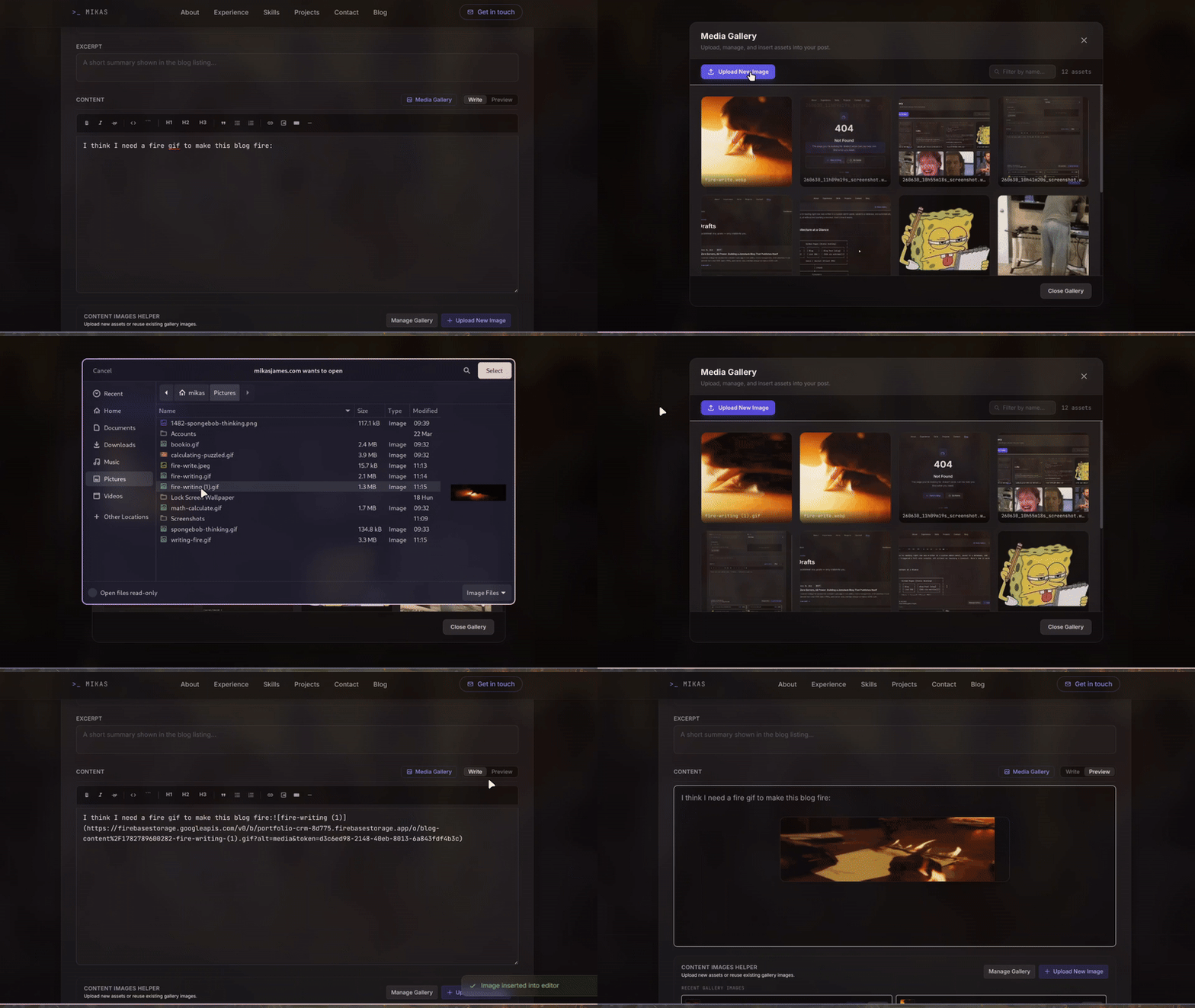
When I upload an image through the admin panel, this function runs in the browser:
// src/lib/utils/imageMeta.ts

async function compressAndGetMeta(file: File) {
  if (file.type === 'image/gif') return { file, width, height };

  const compressed = await imageCompression(file, {
    maxSizeMB: 1,
    maxWidthOrHeight: 1200,
    useWebWorker: true,
    fileType: 'image/webp',
    initialQuality: 0.78
  });
  return { file: compressed, width, height };
}
In plain English: Every image you upload gets converted to WebP, scaled to a reasonable max of 1200px, and compressed to about 78% quality. The result is typically 60 to 80% smaller than the original JPEG or PNG. GIFs pass through untouched because animations are sacred.
The compressed file goes to Firebase Storage, and its dimensions get cached in the imageMeta field on the blog post document.

Render Without the Shift
When the blog post renders, the custom markdown renderer injects those cached dimensions:
const renderer = new marked.Renderer();
renderer.image = ({ href, title, text }) => {
  const meta = imageMeta?.[href];
  const dims = meta
    ? `width="${meta.width}" height="${meta.height}"`
    : '';
  return `<img src="${href}" alt="${text}" ${dims} loading="lazy" />`;
};
In plain English: Before the browser even starts downloading an image, the HTML already says "this image is exactly 1200 by 800 pixels." The browser reserves that space immediately. No content jumping around as images load. The loading="lazy" attribute defers off-screen images until you scroll near them.
The result is a perfect Lighthouse Cumulative Layout Shift score automatically, with no manual effort.
Extended Markdown
Beyond standard markdown, the renderer supports custom syntax for rich media:
!video[Cats being weird](https://www.youtube.com/watch?...)
These get transformed into proper YouTube iframes or native <video> elements, all styled to match the prose.
The Self-Publishing Blog
This is the part that still feels satisfying. When I press "Publish" in the admin panel, here's the chain reaction:
- Firestore saves the document
- A Cloud Function wakes up, listening for any write to the
blogscollection - It decides if the change matters: draft-to-draft? Skip it. Published changed or new post went live? Full speed ahead.
- It calls GitHub's API, dispatching a
deploy-blogevent - GitHub Actions rebuilds the site with fresh
entries(), fresh HTML, and a fresh sitemap - GitHub Pages deploys. About 60 seconds after hitting "Publish," the new post is live
// functions/src/index.ts

export const deployOnPostChange = onDocumentWritten(
  { document: 'blogs/{docId}', secrets: ['GITHUB_PAT'] },
  async (event) => {
    const before = event.data?.before?.data();
    const after = event.data?.after?.data();

    // Don't rebuild if it was a draft and still is a draft
    if (before?.status === 'draft' && after?.status === 'draft') return;
    if (before?.status === 'unlisted' && after?.status === 'unlisted') return;

    // Trigger deploy via GitHub API
    await fetch(
      'https://api.github.com/repos/mikasjames/mikasjames.github.io/dispatches',
      {
        method: 'POST',
        headers: {
          Accept: 'application/vnd.github.v3+json',
          Authorization: `Bearer ${process.env.GITHUB_PAT}`,
        },
        body: JSON.stringify({ event_type: 'deploy-blog' }),
      }
    );
  }
);
In plain English: The Cloud Function is a minimalist bouncer. It checks if the change actually matters, looking for a real status transition. (Draft to Published is a deploy; draft to draft with a typo fix is not.) If the change is meaningful (a new post, an update to a live post, or a deletion), it sends a polite POST request to GitHub saying "rebuild please."
No cron job, no webhook configuration, no polling. The Firestore write itself is the trigger.
Protecting the Build Budget
Every deploy consumes a GitHub Actions minute. With frequent edits, that could add up fast. The draft-to-draft filter in the Cloud Function is what keeps this sustainable:
- Draft-to-draft changes (typo fixes, rephrasing, adding images) are skipped. The function returns immediately, costing nothing.
- Published-to-published updates are deployed. The change is live, so the site should reflect it.
- Draft to Published transitions are deployed. A new post is going live.
- Deletion or Published to Draft transitions are deployed. The post needs to disappear from the live site.
This means I can save a draft twenty times while writing, trigger exactly zero builds, and only burn Actions minutes when something actually changes on the public site. On GitHub's free tier (2,000 minutes/month for private repos, unlimited for public), the blog uses a vanishingly small fraction.
The CI/CD Side
GitHub Actions picks up the dispatch and runs the build:
on:
  push:
    branches: [main]
  repository_dispatch:
    types: [deploy-blog]
  workflow_dispatch:
Every build passes the Firebase environment variables as secrets, so the prerender step can connect to Firestore and pull the latest posts. No hardcoded data, no stale content.
The Sitemap That Builds Itself
SEO requires a sitemap. Manually maintaining one is busywork. So the sitemap is a SvelteKit endpoint that queries Firestore and generates XML at build time:
// src/routes/sitemap.xml/+server.ts

export async function GET() {
  const posts = await getPublishedPosts();
  const urls = posts
    .map(
      (post) => `
    <url>
      <loc>${SITE_URL}/blogs/${post.slug}/</loc>
      <lastmod>${post.createdAt?.toDate().toISOString()}</lastmod>
    </url>`
    )
    .join('');

  return new Response(
    `<?xml version="1.0" encoding="UTF-8"?>
    <urlset xmlns="http://www.sitemaps.org/schemas/sitemap/0.9">
      ${urls}
    </urlset>`,
    { headers: { 'Content-Type': 'application/xml' } }
  );
}
In plain English: Every build generates a fresh sitemap XML file. Google finds every published post automatically. I never touch a sitemap config file.
The robots.txt is also dynamically served, disallowing the /admin/ and /journal/ paths so Google doesn't index my private writing.
Handling Deletions and Stale URLs
What happens when you delete a post or change its slug? The old static HTML page is still sitting on GitHub Pages as a ghost page with a broken heart.
GitHub Actions deploys by syncing the entire build/ directory to the Pages branch. Since the build generates a clean output every time (no incremental builds), any page that wasn't generated simply won't exist in the new deployment. The deploy action is effectively a burn-and-replace: old files vanish, and new files appear.
# .github/workflows/deploy.yml (simplified)
- name: Upload Pages Artifact
  uses: actions/upload-pages-artifact@v3
  with:
    path: 'build/'    # ← always a clean directory

- name: Deploy to GitHub Pages
  uses: actions/deploy-pages@v4
In plain English: Every deploy is a fresh start. The build/ directory is generated from scratch, meaning it only contains pages for posts that exist right now at build time. Delete a post, rebuild, and the old HTML file is gone. No ghost pages, no 404s from stale links, no manual cleanup. The deploy is idempotent: run it ten times with the same data, get the same output.
Unlisted Posts
Not everything needs to be on the front page. The unlisted status is for posts that have a public URL and are prerendered into the build, but don't appear on the /blogs/ list. They also get a <meta name="robots" content="noindex, nofollow"> tag, baked directly into the static HTML at build time instead of being injected client-side.
Use cases: sharing a draft with a client, publishing a changelog without cluttering the blog, or keeping a permanent link to something you don't want search engines to find (for instance, this prank blog). Because the meta tag is part of the prerendered HTML, search engines respect it immediately, with no JavaScript execution required.
// In the [slug] page component
<svelte:head>
  {#if post.status === 'unlisted'}
    <meta name="robots" content="noindex, nofollow" />
  {/if}
  <title>{post.title} | mikasjames.com</title>
  <meta property="og:title" content={post.title} />
  <!-- ... -->
</svelte:head>
Efficiency Lessons
Building this system taught me a few things about what "efficient" really means in a Jamstack context:
Static generation is still king. No server to patch, no runtime to scale, no database connection pool to tune. The site is HTML files on a CDN. It costs nothing to serve and survives any traffic spike.
Database-driven SSG removes the tradeoff. You don't have to choose between a CMS and static output. SvelteKit's entries() pattern means the database drives the build, and the build drives the output.
Image pipelines are a one-time investment. The compression and dimension-caching code took an afternoon to write. It saves bandwidth on every single page load, forever. The WebP conversion alone cuts image payloads by 60 to 80%.
Self-publishing is the killer feature. The distance between "finish writing" and "post is live" is zero steps. No git add, no git push, no SSH, no deploy button. The content management and the deployment are the same action.
Cloud Functions are glue, not business logic. The deploy trigger doesn't transform data or serve requests; instead, it's a 30-line bridge between Firestore and GitHub Actions. That is the sweet spot for serverless functions: simple event reactions, not application backends.
The Full Stack
| Layer | Technology | Job |
|---|---|---|
| Framework | SvelteKit 2 | SSG + client-side admin |
| Hosting | GitHub Pages | Static file serving |
| Database | Firebase Firestore | Content storage |
| Auth | Firebase Auth | Admin panel security |
| Storage | Firebase Storage | Image hosting |
| CI/CD | GitHub Actions | Build + deploy |
| Glue | Firebase Cloud Functions | Firestore → GitHub bridge |
| Markdown | marked + custom renderers |
Content → HTML |
| Images | browser-image-compression |
WebP + resize |
| Styling | Tailwind CSS 4 | Design system |
| Fonts | Inter + JetBrains Mono | Typography |
The result is a blog that feels like a modern web app to write in and a 1999-era static site to read. No servers, no DevOps, no bills. Just write and publish.
If you're building something similar, the code is open source at github.com/mikasjames/mikasjames.github.io. Steal what works, ignore the rest.
While you're at it, HMU 😉